 FnFlow
Your words. Never lost.
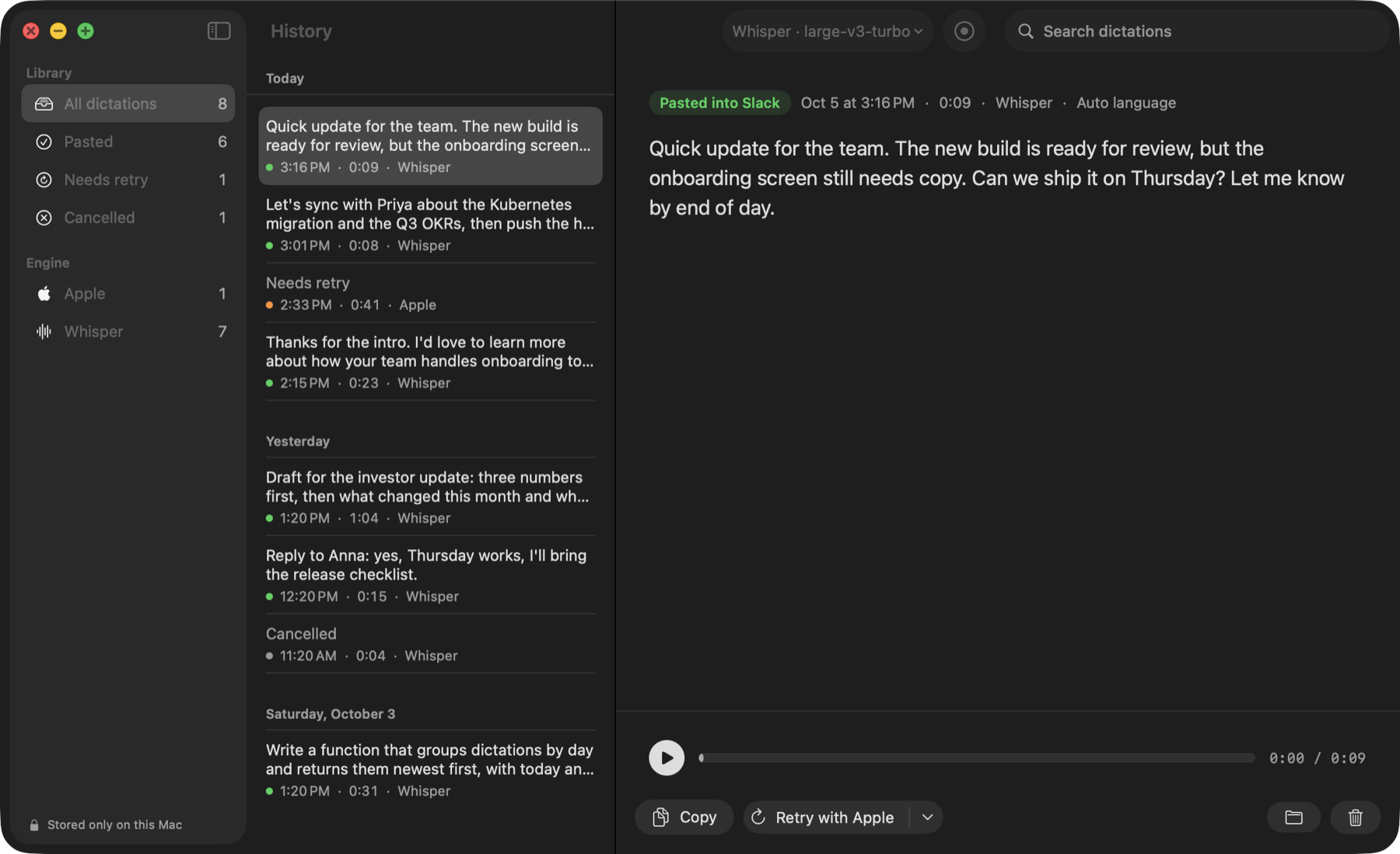
Go back to any dictation. Listen to the recording, copy the text, or try recognition again without repeating yourself.
 View full-size screenshot ↗
Audio + text, on disk
Find a phrase, listen to it again and copy exactly what you need.
Retry with the other engine
Try another engine on the same recording. Apple recognition is available on macOS 26.
Honest paste status
If an app refuses the paste, your text stays in history, ready to copy.
Hear the voice.
Read the result.
This seven-second sample was recognized on a Mac. Play the input and compare it with the unedited transcript.
See the test details →Hear it. Read the result.
Recorded sample · 7 secondsLet's sync with Priya about the Kubernetes migration and the Q3 OKRs, then push the hotfix to staging before the demo on Friday.
Play the sample to see the text appear when it finishes.
A synthetic voice sample, recognized on a Mac. The transcript shown here is the app’s unedited output.
Your voice stays
with you.
Recognition happens locally. Your audio and transcripts aren’t sent to a server.
The app uses the network for model downloads, update checks and optional anonymous usage counts. You can turn those counts off in Settings.
Read the privacy details →Free. No word counter.
- Unlimited dictation
- Custom vocabulary: spelling hints + replacements
- Whisper built in, Apple engine on macOS 26
- History with audio, retry, search
- Paste check in Electron and native apps
- Apple Silicon only, macOS 15 or later; the Apple engine needs macOS 26
- Best accuracy after the 874 MB model finishes downloading in the background
- English is tested most; Whisper recognizes many other languages
- No iPhone or Windows version
Recognition benchmarks & model testsRecordings, timings and methods
Gets your jargon right. The built-in engine doesn't.
Same recording, same Mac: the speech engine built into macOS against FnFlow's Whisper. Plain speech is fine either way; names, acronyms and tech terms are where it splits.
| Run | Time to text | Term errors |
|---|---|---|
| macOS built-in (SpeechAnalyzer) | – | 3 of 3 |
| FnFlow, cold start (0.8.1) | 2.26 s | 0 |
| FnFlow, kept warm (0.9.1+) | 1.17–1.19 s | 0 |
7.6 s sentence, synthetic macOS voice, M4 Pro, 4 Oct 2026. Apple time not measured separately. Whisper large-v3-turbo via whisper.cpp with Metal and flash attention.
Small model now, big model in the background.
We ran 32 real dictations through every light Whisper model to pick the one that ships inside the 187 MB download. Below ~200 MB, only small holds up outside English; base and tiny turn sentences into noise. large-v3-turbo downloads on Wi-Fi after install – in 8-bit, 874 MB, which gave the same text as the full 1.6 GB model on the same 32 dictations – and FnFlow switches to it on its own.
| Model | Size | Diff, non-English | Diff, EN-heavy | Cold run |
|---|---|---|---|---|
| large-v3-turbo · reference | 1.62 GB | reference | reference | 4.01 s |
| small-q5_1 · built in | 190 MB | 24% | 41% | 1.36 s |
| base | 148 MB | 35% | 65% | 0.97 s |
| base-q5_1 | 60 MB | 34% | 70% | 0.73 s |
| tiny | 78 MB | 52% | 65% | 0.24 s |
32 real dictations (24 non-English, 8 mostly English with another language mixed in), ~10 s each, M4 Pro, 5 Oct 2026. Word diff = word-level edit distance against large-v3-turbo's output, not against a human transcript. Cold run = one whisper-cli call including model load; with the warm server a phrase takes about a second.
Under the hoodEngines, storage and privacy
Boring, local, inspectable.
Native menu-bar app. No Electron, no web view, no background browser. Liquid Glass on macOS 26.
The on-device engine that ships with macOS 26. A second option there; on macOS 15 FnFlow runs on Whisper.
Built from a pinned commit, statically linked, Metal shaders embedded. No Homebrew. Flash attention on the GPU, CPU fallback if Metal fails.
Starts when you press fn, so it loads while you talk. Shuts down after 3 idle minutes to free the memory.
History as JSON + CAF, files mode 600. Old recordings go to the Trash, not into the void.
Timings and errors in Console.app for debugging. Your words are never logged.
A few things to know.
How is FnFlow different from Saypad?
They are two builds of the same app, with the same recognition engines and dictation features. FnFlow has the developer presentation; Saypad has the everyday presentation. Choose one – you don’t need both.
Is it safe to install?
FnFlow is signed with an Apple Developer ID and notarized by Apple. It includes a speech model, so there’s no terminal setup. Allow microphone and Accessibility access when the app asks.
Why fn?
It's the one key almost nobody uses while typing. Hold to talk, double-tap for hands-free. If your 🌐 key is busy, FnFlow uses right ⌘ instead – switch in Settings → General, or set macOS "Press 🌐 key to" to "Do Nothing" to use fn.
Does it work in Cursor and other Electron apps?
That's what it was built for. FnFlow asks Electron apps to expose their text fields, pastes, then checks the field. If an app still refuses, the text waits in history and the pill tells you to press ⌘V.
Is anything sent to a server?
Your audio and text – no. Recognition runs locally. The network is used to download a model, check for updates and send anonymous usage counts (no ID, no text, off in Settings). The warm Whisper server listens on 127.0.0.1 only.
Why is it faster after the first dictation?
The model is loaded when you press fn and kept in memory for 3 minutes. Turn that off in Settings if you'd rather save the memory.
Can it learn my project's names?
Yes. Add terms in Settings → Vocabulary and FnFlow passes them to Whisper as a spelling hint on every run. On a test sentence that turned "update Zapot" into "update Saypad" and "post-GIRS" into "Postgres". Replacements ("kubernetes" → "Kubernetes") fix the finished text with any engine.
Does it clean up my speech with AI?
No. It types what you said. Whisper adds punctuation; nothing is rephrased.
Where is my data?
~/Library/Application Support/FnFlow: one JSON and one audio file per dictation. Delete moves them to the Trash.